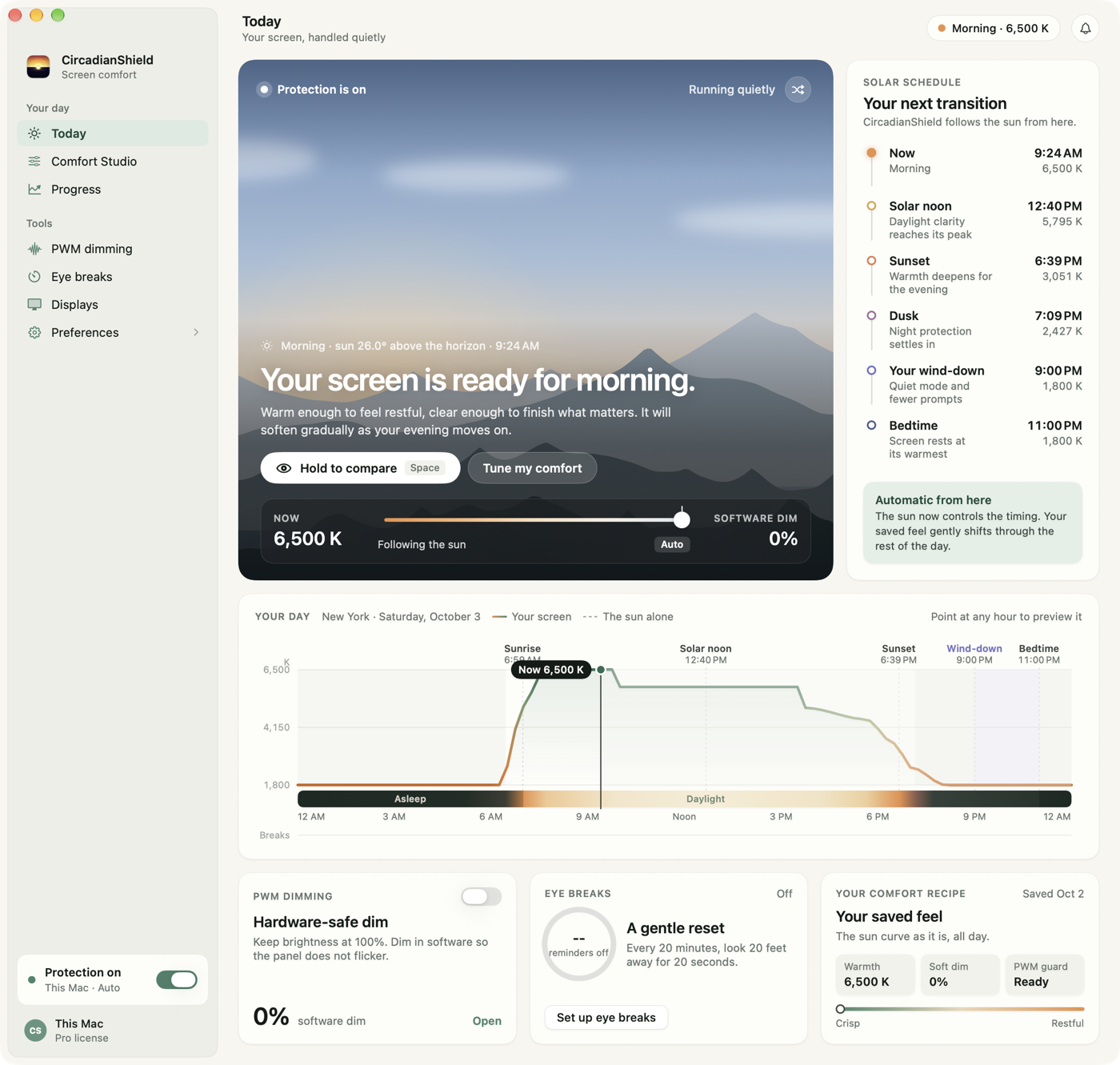
Short answer: the blue light filter on a Mac is Night Shift, and it is already installed. Open System Settings, then Displays, then Night Shift, and set the schedule to Sunset to Sunrise. Apple states that Night Shift needs macOS Sierra 10.12.4 or later and works on Macs introduced in 2012 or later, plus Mac Pro models from 2013 or later. macOS has a second, less-known filter too: Color Filters set to Color Tint, under System Settings, then Accessibility, then Display. Neither one lowers brightness, and neither has a per-monitor setting. When that is the gap, CircadianShield is a Mac blue light filter app that tracks the sun through 11 twilight phases from 6500K daylight down to 1800K candlelight, dims below the normal macOS brightness floor, and treats each display separately. CircadianShield Pro is $47 once for up to 2 computers, runs on macOS 14 or later, and includes a 30-day money-back guarantee. The last two routes, a physical MacBook screen film and blue light glasses, cut a fixed amount all day and cannot change by time of night.
Does Mac have a blue light filter? Yes, and here is exactly where it lives
Every Mac introduced in 2012 or later, running macOS Sierra 10.12.4 or later, has a built-in blue light filter called Night Shift, and CircadianShield exists for the people who try it and want more. Apple's own Night Shift support page puts the path at Apple menu, then System Settings, then Displays, then Night Shift, and notes that the button only appears on Macs that support it. Mac Pro models need to be from 2013 or later.
Night Shift shifts the display warmer, and Apple describes the effect plainly: warmer color temperatures show more yellow and less blue. What it does not do is push brightness below your normal screen floor, hold a different setting per monitor, or change anything gradually through the evening. Those three gaps are the whole reason a blue light filter for Mac search usually ends at a third-party app.
If you want the built-in steps right now, jump to turning on Night Shift below, or read the longer walkthrough on how to turn on blue light filter on Mac. Want the direct head-to-head instead? Read the full Night Shift comparison.
Five ways to filter blue light on a Mac, compared
There is no single blue light filter on a Mac. There are five practical routes, two of them already inside macOS, and most people end up stacking two: Night Shift, macOS Color Filters, a filter app such as CircadianShield, a physical screen film, and blue light glasses. This table is the short version.
| Route | What it changes | Adapts through the evening | External monitors | Cost |
|---|---|---|---|---|
| Night Shift (built into macOS) | Color temperature only | One shift at sunset, back at sunrise | Apple: performance "depends on the characteristics of the display" | Free |
| Color Filters, Color Tint (built into macOS) | Adds a fixed color tint over everything | No, it is a manual on or off | System wide, with no per-display setting | Free |
| CircadianShield | Color temperature, brightness below the macOS floor, PWM protection | Yes, 11 twilight phases from 6500K to 1800K | Yes, each display set separately | 30-day money-back guarantee. $47 once for up to 2 computers |
| Anti blue light film for MacBook | Fixed blue cut in a physical layer | No, same cut at 9am and 11pm | No, cut to fit one screen size | Varies by brand |
| Blue light glasses | Filters light at your eyes, from every source | No, unless you take them off | Yes, and every other light in the room | Varies by brand |
1. Night Shift, the built-in Mac blue light filter (free)
Night Shift ships with macOS and warms your display on a schedule, which makes it the first thing to try before you look at CircadianShield or anything else. It costs nothing and takes about 30 seconds. The limit: one warmth slider, no brightness control, no per-display settings, so a bright screen can still feel harsh at night. If Night Shift never feels warm enough even at full warmth, CircadianShield's article on why Night Shift is not warm enough explains what is capping it. Steps are below.
2. macOS Color Filters set to Color Tint (free, and widely missed)
The second built-in Mac blue light filter is not in Displays at all, which is why most guides skip it: it is Color Filters, under System Settings, then Accessibility, then Display. Set the Filter type pop-up to Color Tint, drag the Tint slider toward amber, and use Intensity to set the strength. Because it is an accessibility filter rather than a display setting, it stacks on top of Night Shift and can go warmer than Night Shift alone. The trade-offs are real: it has no schedule, so you turn it on and off by hand, and it tints photos and video along with everything else. CircadianShield handles the same idea automatically instead, which is the difference between a manual tint and a filter that follows the sun. Step-by-step below.
3. A dedicated Mac blue light filter app
A filter app is the route for Mac users who find Night Shift too mild or too rigid, and CircadianShield is built for exactly that: deeper dimming below the normal macOS brightness floor, 11 twilight phases instead of one setting, stronger evening warmth, PWM protection, and per-display control for external monitors. Screen filtering and health scoring run entirely on your Mac, no account needed, and the only thing that leaves the machine is optional anonymous usage and technical diagnostics you can switch off in Settings. f.lux is the best-known free app in this category and takes a similar warmth-shifting approach with fewer controls; the Iris vs f.lux vs CircadianShield breakdown covers how they differ, and CircadianShield's best blue light filter apps for Mac comparison ranks the field.
4. A physical anti blue light filter for MacBook screens
A physical anti blue light filter for MacBook screens is the hardware answer, and CircadianShield does not sell one, so treat this as market context rather than a pitch. Several companies sell magnetic or adhesive films cut to fit MacBook Air and MacBook Pro panels, and some combine the blue light layer with a privacy tint so people beside you cannot read the screen. A film cuts a fixed share of blue light around the clock and needs no software, which some people prefer. The trade-offs: it cannot adjust by time of day, it can add glare or a slight color cast, and a film cut for a 14-inch MacBook Pro does nothing for the 27-inch monitor next to it. A film pairs fine with a software Mac blue light filter, since the film handles the daytime baseline and the software handles the evening ramp.
5. Blue light glasses for Mac users
Blue light glasses filter light on the way into your eyes, so unlike a Mac blue light filter or CircadianShield they work across every screen and light source in the room, not just your Mac. The catch is that the evidence for blue-blocking lenses is mixed, and tinted lenses can distort color. CircadianShield's review of the research covers whether blue light glasses actually work, and the blue light glasses vs filter software comparison puts the two approaches side by side. Software changes the light at the source. Glasses filter it at your eyes. Plenty of people use both.
How to add a blue light filter on Mac with Night Shift
Adding a blue light filter on a Mac takes about 30 seconds and costs nothing, because Night Shift is already on the machine. Do this before you look at CircadianShield or any other app, so you know what the free baseline feels like. CircadianShield's full step-by-step Night Shift guide covers scheduling and troubleshooting in more depth.
From the Apple menu in the top-left corner, choose System Settings. On older macOS versions this is called System Preferences.
Select Displays in the sidebar.
Click the Night Shift button in the Displays pane. Apple notes that this option only appears on Mac computers that support Night Shift.
Choose Sunset to Sunrise so it follows your local sunset, or set a custom schedule if you keep late nights.
Drag the slider toward More Warm. Apple describes the effect as showing more yellow and less blue. There is no numeric readout, only a relative scale.
Which Macs support Night Shift? Apple states that Night Shift requires macOS Sierra 10.12.4 or later and is available on Mac computers introduced in 2012 or later, as well as Mac Pro computers introduced in 2013 or later. If Night Shift does not appear under Displays, your Mac is older than that cutoff. CircadianShield needs macOS 14 or later, so it is not a workaround for those machines.
Faster on any MacBook Air, MacBook Pro, iMac or Mac mini: the steps above are the same on every Mac model. To switch Night Shift on or off without opening System Settings, click Control Center in the menu bar, click Display, then click Night Shift. Apple also lets you turn it on or off with Siri.
How to turn on the second Mac blue light filter, Color Filters
macOS Color Filters is the Mac blue light filter people miss, and it is worth knowing about before you decide whether CircadianShield is necessary. It lives in Accessibility rather than Displays, and it stacks on top of Night Shift.
From the Apple menu, choose System Settings, then click Accessibility in the sidebar.
Click Display on the right, then scroll to the Color Filters section.
Switch Color filters on. Apple describes it as adjusting display colors using the selected filter type.
Set the Filter type pop-up menu to Color Tint, rather than Grayscale, Red/Green, Green/Red or Blue/Yellow.
Drag the Tint slider toward amber or red, then use Intensity to set how strong it is. Switch Color filters back off when you need accurate color for photo or design work.
How to turn off blue light on a Mac (what that phrase usually means)
Searches for how to turn off blue light on a Mac almost always mean turning the blue down, not turning a filter off, so CircadianShield answers both readings here. To cut blue as far as macOS alone allows: set Night Shift to Sunset to Sunrise and drag the slider to More Warm, then add Color Tint under Accessibility if you want more, then lower screen brightness, because a warm screen at full brightness still feels harsh in a dark room. For a larger cut than macOS offers, CircadianShield takes the display to 1800K candlelight at its deepest twilight phase and dims below the macOS brightness floor. If you did mean removing the warm tint from your screen, that is the turn the filter off section below.
Blue light filter options for older Macs that Night Shift skips
If your Mac is older than the Night Shift cutoff, CircadianShield is not the answer either, and it is worth saying that plainly: CircadianShield requires macOS 14 Sonoma or later, so any Mac that cannot run Night Shift cannot run CircadianShield. On a 2011 or earlier Mac, or one stuck on OS X El Capitan and below, the realistic route is f.lux, whose current macOS build of f.lux runs on OS X 10.9 and later and which still publishes legacy Mac builds going back as far as Snow Leopard alongside its current Mac, Windows, Linux, iOS and Android versions. The second option is a physical anti blue light film fitted to the screen. The third is the display's own controls: on an external monitor connected to an old Mac, the monitor's on-screen menu usually has a warm or low blue light preset that works regardless of what macOS supports. CircadianShield's f.lux alternatives roundup lists what each of those tools actually does.
How to turn off the blue light filter on a Mac
Turning the Mac blue light filter off is the reverse of turning it on, and CircadianShield has a one-click version of the same thing. Go back to System Settings, then Displays, then Night Shift, and set the schedule to Off, or drag the warmth slider to Less Warm. If you also switched on Color Filters, turn it off under System Settings, then Accessibility, then Display. That is the quickest way to get rid of the warm tint for photo or design work. If you run CircadianShield, you can pause it from the menu bar for color-critical work and switch it back on when you are done.
Can I turn the blue light off on my Mac completely?
Not completely, and no Mac blue light filter can promise that, CircadianShield included. A backlit LCD or OLED panel builds every color it shows out of red, green, and blue subpixels, so removing all blue would leave you with no white and no usable color at all. What a filter does is shrink the blue share. Night Shift at its warmest lands in the warm-white range, and CircadianShield goes further, down to 1800K candlelight at the deepest phase, which is roughly the color of a flame rather than a screen. That is a large cut in short-wavelength output, not a zero. If your goal is the least stimulating screen possible, combine a strong warm setting with real dimming, which is why CircadianShield pairs the 1800K floor with dimming below the normal macOS brightness limit. CircadianShield's explainer on what Kelvin actually means for your screen covers why 1800K and 6500K describe such different light.
Can you automate blue light settings on a Mac?
Automating a Mac blue light filter is worth setting up once so you never think about it again, and CircadianShield is built around exactly that. Night Shift's Sunset to Sunrise schedule is the built-in route: one warmth shift at sunset, back at sunrise. Color Filters has no schedule at all. CircadianShield automates the whole evening instead, tracking the sun's actual position through 11 twilight phases so the screen warms and dims gradually as the night goes on. That solar approach is the core of CircadianShield's circadian rhythm app design.
Why filtering blue light on a Mac at night is worth the effort
Mac screens lean heavily on short-wavelength blue light, which is the reason a blue light filter for Mac like Night Shift or CircadianShield exists at all. Your body reads that light as a daytime signal. The retinal cells that set your internal clock, the ipRGCs, are most sensitive to light around 480nm, right in the blue range. A bright blue screen late in the evening tells those cells it is still daytime.
Research in PNAS (Chang et al.) found that evening use of a light-emitting screen delayed the release of melatonin and pushed the body clock later, compared with reading on paper. Warming and dimming the screen in the hours before bed reduces that signal. It will not undo a late night on its own, and CircadianShield is a wellness app rather than a medical device, but a calmer evening screen is a reasonable thing to want. CircadianShield measures that signal in Melanopic EDI, the CIE S 026 metric built around the ipRGC response, rather than raw brightness in lux, and CircadianShield's explainer on Melanopic EDI covers why that difference matters. For the full breakdown, see what the science actually says about blue light, or CircadianShield's guide to blue light and sleep.
What a dedicated Mac blue light filter app adds
If you land on the app route, a good blue light filter for Mac such as CircadianShield should do more than add a warm tint. It should make the screen easier to live with late at night.
- Deeper dimming below the normal macOS brightness floor, so the screen can feel calmer in a dark room.
- 11 twilight phases from 6500K daylight to 1800K candlelight, instead of one generic setting.
- Stronger evening warmth when Night Shift still feels too mild.
- Per-display control for a MacBook plus one or two external monitors.
- PWM protection for panels that dim by pulsing their backlight.
- Melanopic EDI framing built on the CIE S 026 standard, not just a temperature slider.
- Runs on device, no account, optional anonymous diagnostics. Your screen content and personal data never leave your Mac. The app sends only optional anonymous usage and technical diagnostics you can switch off in Settings. Pricing is simple too: one $47 payment for Pro, no subscription.
That is why CircadianShield works as a blue light filter app for Mac users who already know Apple has a built-in option and want something more. If harsh screens are also leaving your eyes tired, the same evening filtering can help with eye strain relief, and CircadianShield's digital eye strain statistics page covers how common that is. Some MacBook panels also pulse their backlight at low brightness, so if a dim screen bothers your eyes, CircadianShield's monitor flicker test shows how to check and the laptop PWM flicker guide covers what to do about it. Prefer a deeper dim over a warmth shift? See the screen dimmer for Mac page.
Blue light filtering on a Mac with external monitors
An external monitor is where a Mac blue light filter usually falls apart, and it is the main reason people go looking past Night Shift toward CircadianShield. Apple's own documentation is blunt about it: Night Shift performance on external displays depends on the characteristics of the display. There is no per-monitor slider either, so you end up with a warm MacBook screen sitting next to a cold 27-inch panel, which is worse for your eyes than either one alone because they force your eyes to keep re-adapting.
There are three ways to fix that mismatch on a Mac:
- The monitor's own menu. Most external displays have a low blue light or warm preset in their on-screen menu. It is free and it works no matter what macOS does, but it is a fixed setting you have to change by hand twice a day.
- Per-display software. CircadianShield applies its filter per display, so the MacBook panel and each external monitor can hold their own warmth and brightness level and still follow the same solar schedule. That is the part Night Shift has no answer for.
- Match brightness, not just color. A monitor at 100% brightness in a dark room stays harsh even when it is warm. CircadianShield can dim external displays below the level the monitor's own buttons reach, which is usually what people are actually chasing. CircadianShield's guide to monitor settings for eye health covers the brightness and contrast side.
One more thing worth checking on a multi-monitor Mac setup: many panels dim by pulsing their backlight rather than lowering it steadily, and that flicker bothers a lot of people once the screen gets dim. CircadianShield's PWM flicker guide explains how to tell whether your monitor does it, and the app includes PWM protection for panels that do.
Who uses CircadianShield on Mac
CircadianShield on Mac is built for people who already ran into the Night Shift ceiling. Five groups turn up most often.
Late-night workers: writers, founders, and analysts who are still in front of a MacBook at 10pm and want the screen to feel less stimulating.
Night-time coders: developers running long sessions in a dark room, where a white terminal or IDE panel is the brightest thing in the house. CircadianShield's per-display control matters here because most coding setups have a MacBook plus one or two external monitors. CircadianShield's display settings for developers page covers the full setup, and eye health for developers covers the habits around it.
MacBook users who tried Night Shift: people searching for a blue light filter MacBook solution because the built-in filter still feels too bright.
MacBook Pro and external monitor setups: users who want a MacBook Pro blue light filter workflow that keeps multiple screens comfortable after dark.
Sensitive users: anyone who notices that a bright evening display changes how fast they wind down, including people who already run dark mode and found it was not enough. CircadianShield's guide to dark mode and eye strain explains why dark mode and a blue light filter are different levers.
If you want the more specific search-intent pages, see Blue Light Filter for MacBook, MacBook Pro Blue Light Filter, and Screen Dimmer for Mac.
What CircadianShield for Mac costs
CircadianShield installs on macOS 14 Sonoma or later, runs in the menu bar, and needs no account. Choose a mode or a schedule and let it run. Pricing is one payment, not a subscription:
- CircadianShield Pro, $47 once. All display modes, health dashboard, light debt tracking, PWM protection, per-display control, advanced breaks, keyboard shortcuts, and profiles. One payment covers up to 2 computers.
- CircadianShield Core, $27 once. PWM protection and warmth, also up to 2 computers, upgradable to Pro in the app for $20.
- 30-day money-back guarantee on both editions. Pay once for a lifetime license. If it is not right for you, contact support within 30 days of purchase for a full refund.
Ready to buy? Buy CircadianShield Pro for $47.
CircadianShield vs Night Shift, side by side
| Feature | Night Shift | CircadianShield |
|---|---|---|
| Color temperature control | One warmth slider, no numeric readout | 11 twilight phases, 6500K to 1800K |
| Dimming below the macOS brightness floor | No | Yes |
| Schedule | Sunset to sunrise, or custom hours | Solar elevation, gradual through the evening |
| External monitor handling | Varies by display, no per-monitor setting | Each display set separately |
| PWM flicker protection | No | Yes |
| macOS requirement | macOS 10.12.4 or later | macOS 14 or later |
| Price | Free, built in | 30-day money-back guarantee. $47 once |
That is the honest pitch: Night Shift is better than nothing and it is free, so start there. CircadianShield goes further for Mac users who need more control than one slider gives them.
Common questions about blue light filters for Mac
Does my Mac have a blue light filter?
Yes, if it is a Mac introduced in 2012 or later (or a Mac Pro from 2013 or later) running macOS Sierra 10.12.4 or later. Apple's built-in Mac blue light filter is called Night Shift and it lives under System Settings, then Displays, then Night Shift. It warms the display on a schedule and costs nothing. What Night Shift does not do is lower brightness or treat each monitor separately, which is the gap CircadianShield is built to fill.
Is there a blue light filter on a Mac?
There are two built into macOS. Night Shift, under System Settings, then Displays, is the scheduled one that warms the screen from sunset to sunrise. macOS Color Filters set to Color Tint, under System Settings, then Accessibility, then Display, is a manual tint you leave on until you switch it off. Neither one lowers brightness, so the third route is a filter app. CircadianShield is the Mac blue light filter app built for that gap: 11 twilight phases from 6500K down to 1800K, dimming below the normal macOS brightness floor, and a separate setting for every display.
Is there a blue light mode on Mac?
Yes. The blue light mode on a Mac is called Night Shift, found under System Settings, then Displays. It warms the screen on a schedule. If you want a stronger blue light mode with real dimming and per-display control, CircadianShield adds that on top.
How do I add a blue light filter on Mac?
Open System Settings, then Displays, then Night Shift, and set the schedule to Sunset to Sunrise. That adds Apple's built-in blue light filter on any Mac running macOS 10.12.4 or later, and it takes about 30 seconds. To add a stronger filter on top, install CircadianShield, which runs in the menu bar on macOS 14 or later and adds deeper dimming, 11 twilight phases down to 1800K, and per-display control.
How do I reduce blue light on my Mac?
Stack three things, in this order. Turn Night Shift on and drag the warmth slider to More Warm. Lower screen brightness, because a warm screen at full brightness still feels harsh in a dark room. Then, if that is still not enough, add a filter app. CircadianShield handles all three at once on macOS 14 or later: it warms through 11 twilight phases to 1800K, dims below the normal macOS brightness floor, and holds a separate setting for each display.
How do I turn on eye protection on my Mac?
macOS has no single setting called eye protection, so on a Mac it is three separate controls: Night Shift under System Settings, then Displays, for warmth; the brightness keys or slider for light level; and Color Filters set to Color Tint under System Settings, then Accessibility, then Display, for an extra tint. CircadianShield bundles the equivalent of all three into one menu bar app and adds a break timer, but nothing here is medical eye protection. It is screen comfort.
How do I turn on the blue light filter on my MacBook?
The built-in path is the same on MacBook Air and MacBook Pro: System Settings, then Displays, then Night Shift, then Sunset to Sunrise. If you want a stronger MacBook blue light filter setup, install CircadianShield and pick a mode designed for late-night work.
How do I turn off blue light on a Mac?
Most people searching for this want the blue turned down, not the filter turned off. To cut blue as far as macOS alone allows: open System Settings, then Displays, then Night Shift, set Sunset to Sunrise, and drag the slider to More Warm; then lower the brightness. For a bigger cut, CircadianShield takes the display down to 1800K candlelight at its deepest twilight phase and dims below the macOS brightness floor. If you actually meant removing the warm tint, set the Night Shift schedule to Off instead.
Can I turn the blue light off on my Mac?
Not entirely. A Mac display mixes red, green, and blue subpixels to make every color it shows, so cutting blue to zero would leave the screen unusable. A blue light filter shrinks the blue share instead. Night Shift at full warmth gets you into warm-white territory, and CircadianShield goes down to 1800K candlelight at its deepest twilight phase, which is a much larger cut but still not zero.
Is Night Shift on a Mac good for your eyes?
Night Shift makes an evening Mac screen less blue, and many people find a warmer screen more comfortable to look at after dark. It is not eye treatment, and neither is CircadianShield, which is a wellness app rather than a medical device. The bigger driver of tired eyes is usually brightness and how long you stare without a break, and Night Shift changes neither of those. That is why it helps some people and does nothing noticeable for others.
Does Night Shift actually reduce blue light on a Mac?
Yes. Apple describes warmer color temperatures as showing more yellow and less blue, so Night Shift is a real reduction in the blue your Mac screen sends out. The limit is that it is one warmth setting and it does not lower brightness. A 2018 Lighting Research Center study (Nagare, Plitnick and Figueiro, Lighting Research & Technology) tested Night Shift on iPads and found melatonin suppression did not differ significantly between its low and high color temperature settings. The authors concluded that changing a screen's color without changing its brightness may not be enough. That is why turning brightness down matters as much as warming the screen, and why CircadianShield dims as well as warms.
Does Night Shift work on external monitors?
Sometimes, and never with per-monitor control. Apple's own documentation says Night Shift performance on external displays depends on the characteristics of the display, and Night Shift applies one warmth setting to the Mac rather than a separate setting per display. That is why a warm MacBook screen next to a cold external panel is such a common complaint. CircadianShield filters and dims each display separately on the same solar schedule, and most external monitors also have a low blue light preset in their own on-screen menu as a free fallback.
Which Macs support Night Shift?
Apple states that Night Shift requires macOS Sierra 10.12.4 or later and is available on Mac computers introduced in 2012 or later, as well as Mac Pro computers introduced in 2013 or later. If you do not see a Night Shift button under Displays, your Mac is probably older than that. CircadianShield is not a workaround for those machines, since it needs macOS 14 or later, so on a genuinely old Mac look at f.lux, which still publishes legacy Mac builds, or a physical screen film instead.
Is there an anti-blue light filter available for MacBooks?
Yes, in two forms. Several companies sell physical anti blue light films cut for MacBook Air and MacBook Pro screens, sometimes combined with a privacy tint, which cut a fixed amount of blue light all day. The software form is an app: Night Shift for free, or CircadianShield for a filter that changes through the evening and covers external monitors as well as the MacBook panel. The film cannot adapt by time of day and only fits the screen it was cut for.
Do physical blue light screen filters for MacBook work?
A physical screen filter does cut some blue light, and it needs no software. The downside is that it filters the same amount all day, can add glare or a color cast, and only covers the screen it is cut for. For most people a software filter is more flexible, since it can warm and dim the screen only in the evening and cover external monitors too. CircadianShield does not sell film, so treat that as market context rather than a pitch.
Does dark mode cut blue light on a Mac?
Not in the way a blue light filter does. Dark mode swaps white backgrounds for dark ones, so less total light leaves the panel, but the white text and the accent colors still come from the same blue-heavy subpixels. Night Shift and CircadianShield change the color of the light itself, which is a different lever. Running dark mode and a Mac blue light filter together is fine and fairly common.
How do I turn off the blue light filter on my Mac?
Go to System Settings, then Displays, then Night Shift, and set the schedule to Off, or drag the warmth slider toward Less Warm. If Color Filters is on, switch it off under System Settings, then Accessibility, then Display. If CircadianShield or another filter app is running, pause or quit it from the menu bar. This is the quickest way to get rid of the warm tint for photo or design work.
Can I automate blue light settings on a Mac?
Yes. Night Shift can follow a Sunset to Sunrise schedule, which is one warmth shift at sunset and back at sunrise. CircadianShield automates the whole evening instead, tracking the sun's actual position through 11 twilight phases so the screen warms and dims gradually without manual changes.
What is the best blue light filter app for Mac?
If you already tried Night Shift and want more, CircadianShield is built for that gap. It gives you a blue light filter for Mac that adds deeper dimming, stronger evening warmth, 11 twilight phases, and a separate setting for each display. f.lux is the best-known free alternative and runs on older macOS releases than CircadianShield does, so it is the sensible pick on an older Mac.
Does a blue light filter on Mac actually help with sleep?
It may help make your evening screen less stimulating, especially when the filter is strong enough to matter and the screen is dim enough to feel calmer. CircadianShield is a wellness app, not a medical device, so it is designed to support a calmer evening screen rather than treat any condition. CircadianShield's guide on blue light filters and sleep walks through the research.
Is a paid blue light filter app worth it when Night Shift is free?
Turn on Night Shift first, since it is free and built in. A paid app earns its place only if the free option leaves a real gap. For most people that gap is brightness and per-monitor control, which is the part CircadianShield is built to close. CircadianShield Pro is $47 once for up to 2 computers, with a 30-day money-back guarantee.
Ready to try a real blue light filter for Mac?
If Night Shift and Color Filters are close but not enough, CircadianShield is the Mac blue light filter built for that gap. Buy CircadianShield, or compare with f.lux if you are still evaluating alternatives. If your search started with a laptop-specific query, visit Blue Light Filter for MacBook or MacBook Pro Blue Light Filter. On a PC instead? See the Blue Light Filter for Windows guide. For the full science-based overview, read CircadianShield's complete blue light filter guide, or the ranked best blue light filter software roundup if you are still shortlisting apps.